Programming Interface
Industrial Asset Hub consists of a growing number of services supporting its users.
Access the platform via a centrally hosted cloud service. Reach shop floor instances via gateway applications, consisting of the Asset Gateway and one or more Asset links. Host the application on Industrial Edge or as docker-compose on any machine that can run containers.
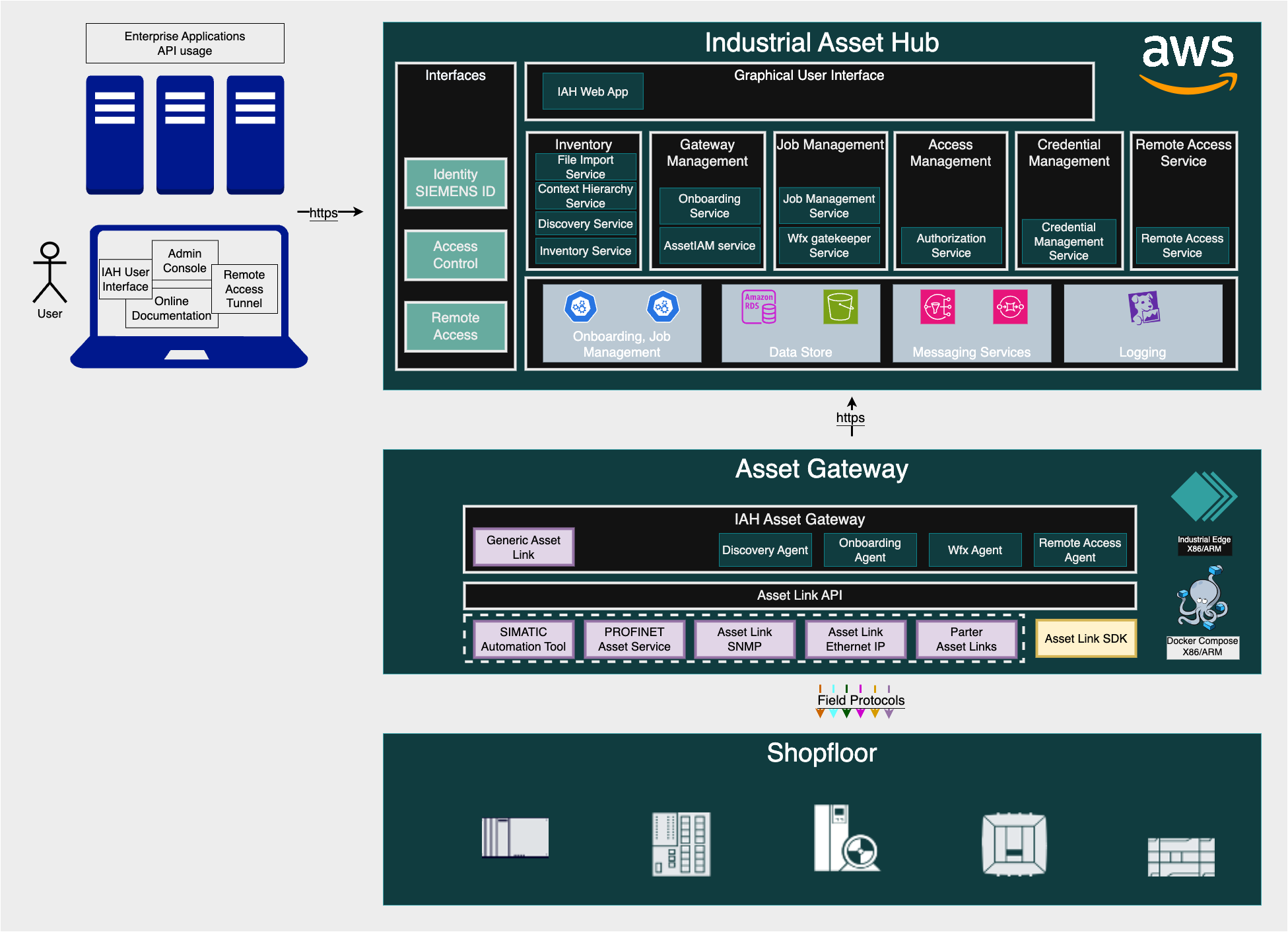 Figure: High level architecture diagram
Compatibility
The following tables provide an overview of the compatibility between the different components. All components are versioned using semantic versioning.
The compatibility between the Asset Gateway and the respective Asset links is determined by the version of the Asset link API.
| Asset Gateway | Asset Link API versions |
|---|---|
| >= 0.3.10 | "siemens.commondevicemanagement.devicediscovery.v1" "siemens.commondevicemanagement.firmwareupdateApi.v1" "siemens.connectivitysuite.registry.v1" "siemens.connectivitysuite.alarmsevents.v1" "siemens.connectivitysuite.drvinfo.v1" "siemens.connectivitysuite.driverevent.v1" |
Xcelerator Foundation
| XF component | Comment |
|---|---|
| API Gateway | Central entry point for applications that are part of the Xcelerator platform. IAH as self hosted service is registered at this gateway. There are two IAH applications that can be provisioned to a tenant. The API app is only to have access to the IAH cloud service APIs which is used by the Asset Gateway as well. And the UI app which provides IAH with an web interface for users. |
| SAM Auth | Security and Access Management (SAM) handles authentication and authorization for Siemens cloud services. Use it to manage users, groups, roles, policies and access keys. |
IAH cloud instance
| IAH Cloud Component | Comment |
|---|---|
| API Gateway (Kong) | Acts as central access layer to the IAH cloud services by forwarding the incoming requests to the upstream services. |
| IAH Auth (Kong-)Plugin | Custom Kong Plugin to handle the authentication and authorization of the incoming requests. It checks that the token signature is valid, extracts relevant information from the token claims and checks that the provided roles match with those required for the requested resource. |
| Discovery Service | Provides a REST API to create, read, update and schedule discovery jobs. Each job is linked to a particular gateway. The service uses the WFX service to handle the interactions with jobs and to store them. |
| Inventory API Service | Provides a REST API to create, read, update, and delete assets in the inventory. |
| WFX Gatekeeper Service | Provides the WFX northbound and southbound REST APIs to create and read workflows as well as to create, read and update jobs. This service is needed as the WFX service does not handle multi-tenancy. The gatekeeper maps the gateway IDs to tenant IDs to ensure that a gateway can only interact with jobs belonging to the same tenant. |
| WFX Service | Is a lightweight, general-purpose workflow executor. Workflows can be modeled as finite state machines to describe different kind of tasks e.g. asset discovery. An instance of this workflow is called a job. These jobs will be created by an IAH cloud component and can be picked up and executed by the IAH gateway agents. |
| initdb PostgreSQL | A Tool that can be added as an init container to a service to create a database user and a database in the PostgreSQL instance. The output can be used by the service to establish a secure connection to this database. |
| Remote Access Service | Provides a REST API to establish remote connections to view an asset's web/ssh server. |
| Job Management Service | Provides a REST API to retrieve all IAH jobs irrespective of type. |
| Credential Management Service | Provides a REST API to manage credentials for assets. The corresponding schema and their credentials are also stored. |
| File Import Service | Provides a REST API to import asset data from IAH import excel file templates and manage file import jobs. |
| Context Hierarchy Service | Provides a REST API for creating context-based asset hierarchies to provide a context view of real plant use cases. |
Asset Gateway
| Gateway / Asset Gateway | Comment |
|---|---|
| Auth Proxy Agent | The auth proxy agent authenticates the Asset Gateway agents against the backend. It requests a JSON Web Token (JWT) from the SAM Auth instance. Every request from the Asset Gateway agents goes to the auth proxy agent. It sets the JWT as the bearer token in the authentication header and forwards the requests to the cloud backend. |
| gRPC Service Registry | The gateway of Industrial Asset Hub hosts the gRPC service registry as part of the Asset Gateway application. The backend services of Industrial Asset Hub communicate with the Asset links through the Asset Gateway. All these drivers implement one or more gRPC services such as asset discovery or firmware update. The Asset Gateway discovers a specific Asset link via the gRPC service registry to get its connection address. |
| Discovery Agent | The agent cyclically requests new discovery jobs. If a new job exists, the agent searches the registry for the relevant Asset link address, connects to the Asset link, and performs the discovery process. |
Asset link
Asset links act as adapters/drivers, between the Asset Gateway and the field devices. IAH provides an Asset link SDK that device builders can use to speed up their own Asset link development. This SDK already includes the gRPC interfaces for the IAH use cases (e.g. discovery) so that the Asset link writer can focus on implementing the features.
Industrial Asset Hub backend APIs
Inventory API
Discovery API
GW Onboarding API
Asset IAM API
Authorization API
Workflow Executor API
Remote Access API
Job Management API
Credential Management API
File Import API
Context Hierarchy API
Updatehub API
Download Specifications
Download the complete package of API specifications here: API_Specs
Programmatic Access
To programmatically access the Industrial Asset Hub APIs, use the correct API URL (https://cloud.eu1.sws.siemens.com/api/assethubapi/v1/your-endpoint) and obtain a technical token. Acquire this token from a server user. Follow the steps below to obtain a token and use it to access the API:
Obtain a Token from a Server User
- Go to the Xcelerator Admin Console, create a server user, and download the credentials.
- Send a POST request to the token service with your server user credentials.
-
Extract the JSON Web Token (JWT) from the response.
curl https://iahprod.eu1.sws.siemens.com/oauth/token \
 -X POST \
  --header "Content-Type: application/x-www-form-urlencoded" \
  -d grant_type=client_credentials \
  -d client_id=<clientId> \
  -d client_secret=<clientSecret>
Use the Token to Access the API
-
Include the JWT in the Authorization header of your API requests.
curl --header "Authorization: Bearer your_jwt_token" https://cloud.eu1.sws.siemens.com/api/assethubapi/v1/your_endpoint
These steps authenticate and enable interaction with the Industrial Asset Hub APIs programmatically.